Determine Which iPhone or iPad You Have
Before you schedule a repair, take a moment to verify your exact device model. You'll find the model number printed on the back of your iPhone or iPad — just locate it and compare it with the reference lists below. Confirming your model lets us have the correct parts ready for your visit.
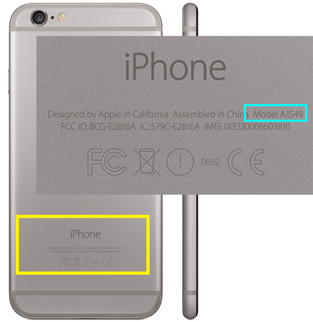


iPhone Model Number Reference
- iPhone 6 Plus — A1522, A1524, A1593
- iPhone 6 — A1549, A1586, A1589
- iPhone 5s — A1453, A1457, A1518, A1528, A1530, A1533
- iPhone 5c — A1456, A1507, A1516, A1529, A1532
- iPhone 5 — A1428, A1429, A1442
- iPhone 4s — A1431, A1387
- iPhone 4 — A1349, A1332
iPad Model Number Reference
- iPad Air — A1474, A1475, A1476 (Air); A1566, A1567 (Air 2)
- iPad Mini — A1432, A1454, A1455 (Mini); A1489, A1490, A1491 (Mini 2); A1599, A1600 (Mini 3)
- iPad 2nd, 3rd & 4th Gen — A1395, A1396, A1397 (2nd Gen); A1416, A1430, A1403 (3rd Gen); A1458, A1459, A1460 (4th Gen)
- iPad 1 — A1219, A1337
Common Questions
Where do I find the model number on my iPhone or iPad?
It's printed on the back of the device. Once you have it, compare it with the lists above to confirm which iPhone or iPad you own.
Why does the model number matter for a repair?
Every model uses different components. Confirming your exact model number helps ensure the right screen, battery, or other parts are used for your device.
What if my model number isn't listed here?
This page covers the models shown above. If your device isn't listed, get in touch and we can help identify it before your repair.
Can I check my model without looking at the back of the device?
Yes. You can also find the model information in your device's Settings under General > About. The number on the back cover is the fastest reference for matching the lists on this page.
Do you repair both iPhones and iPads?
Yes. Charlotte iPhone Repair services iPhone and iPad devices, plus iPod repair. See our iPod Repair page for iPod details.
How do I book a repair once I know my model?
Explore More
Discover more about our shop and services, or reach out to arrange your repair.
Home Identify Your Device iPod Repair Contact Us FAQ About Reviews Facebook Yelp Email UsNot sure which model you have? The model number on the back cover is the quickest way to confirm it, and you can also check Settings under General > About. Once you know your model, our team can make sure the right parts are ready for your iPhone or iPad repair.